Appearance
Payments
Right now Biponix offers one payment method: Cash on Delivery. Your customer orders without paying, and hands over the money when the parcel reaches them.
That is how most online shopping in Bangladesh already works, so it will be familiar to your customers.
Turn it on
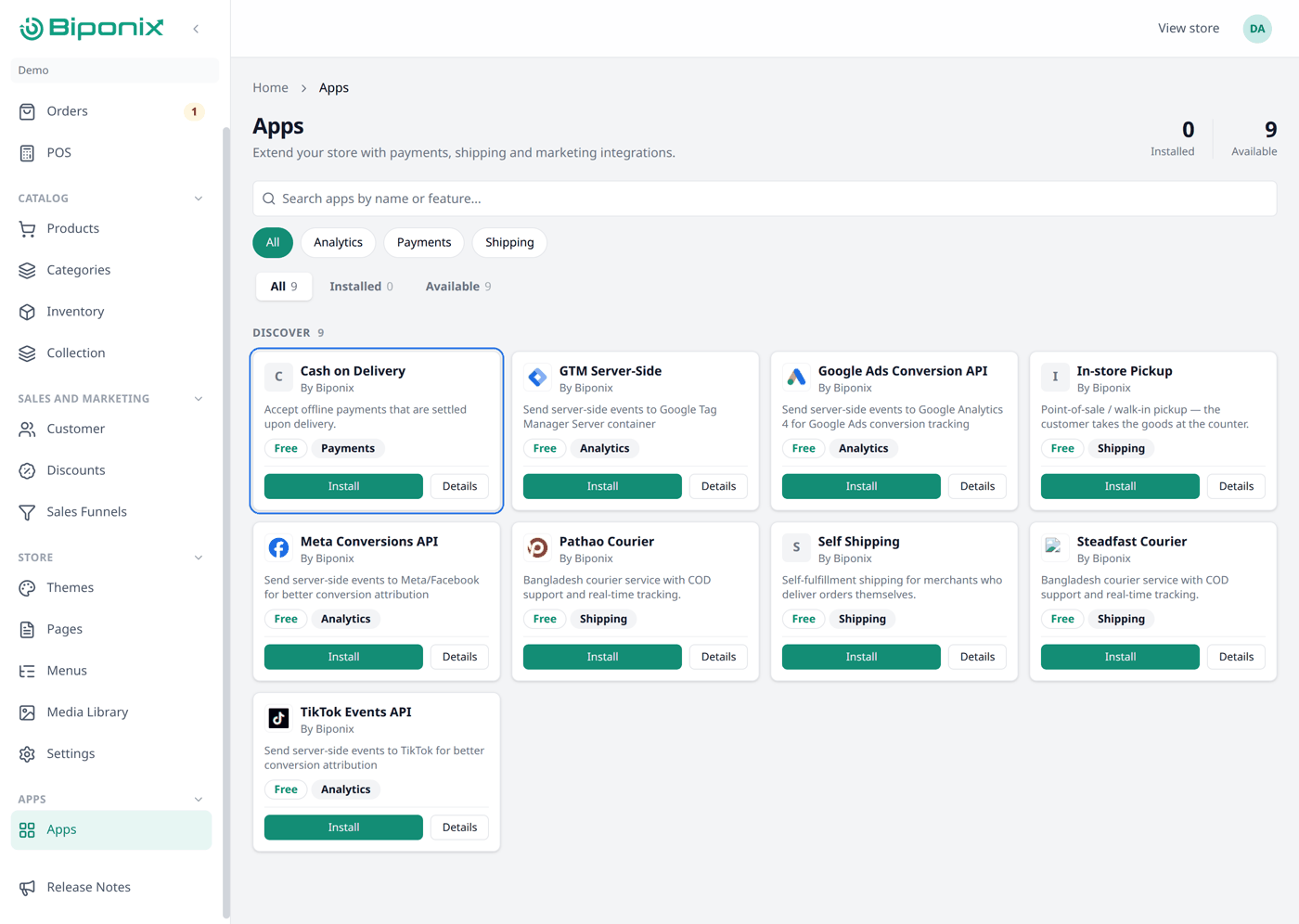
Cash on Delivery comes as an app. Find Cash on Delivery in Apps and press Install.
That is it — you are all set up.
Adding an app
Apps are the extra services your shop connects to, such as ways to take payment or delivery companies. Go to Apps in the menu, find the one you want, and press Install. Some apps need a few details before they work — those show Needs setup, and you add the details by pressing Configure.
Checking it worked
Open Settings, then Payments. Cash on Delivery should be listed under Payment providers.
That card lists the payment apps your shop has installed. If it is empty, no payment app is installed yet, and customers will not be able to place an order.
What your customers see
At checkout, your customer picks Cash on Delivery and finishes their order without paying anything yet. The order arrives in your Orders list as normal, and you collect the money when you deliver.
Other payment methods
There are none yet. Card payments and mobile wallets are not available on Biponix at the moment, so Cash on Delivery is the one to use.
This page will be updated once more payment methods are added.
What next
Now your customers can pay you. Next comes Shipping & delivery, so their orders can reach them.