
Appearance
Payments
Open Settings, then Payments. Two cards live here — how you take payment, by hand, and the payment apps your storefront checkout uses.
Payment methods
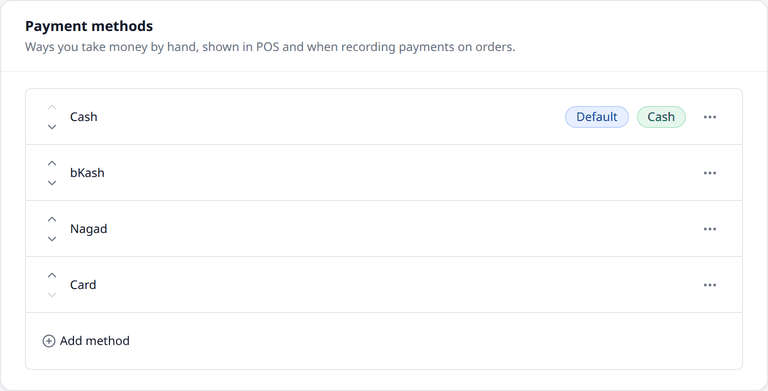
These are the ways you take payment by hand — cash, a mobile wallet, a card machine. You will see them in POS, and when you record a payment on an order. Your shop starts with a few already added: Cash, bKash, Nagad and Card.
Press Add method to add one.
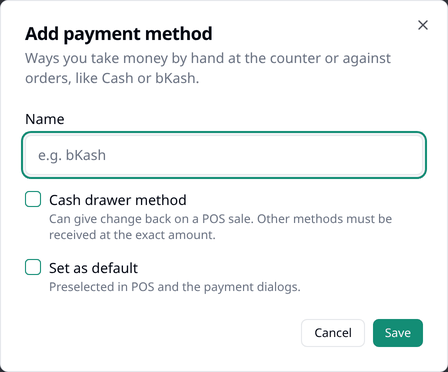
- Name — up to 50 characters, such as "Cash" or "bKash".
- Cash drawer method — turn this on if the method can give change back on a POS sale. Without it, you can only take the exact amount.
- Set as default — turn this on to make this method the one already chosen in POS and for order payments. Only shown when adding a method; use Set as default in a method's own menu to change it later.
Press the … menu beside a method to Edit it, Set as default, Archive it, or Delete it. Editing a name also updates past payments — they show the new name. Archiving removes a method from POS and from order payments, while keeping it on old payments. The current default method cannot be archived — make another one default first. Delete is only possible for a method that has never been used and is not the default — archive it instead if it has been used.
The ⌃ and ⌄ arrows reorder your methods, and the order they are in here is the same order they appear in POS and for order payments.
Up to 20 active methods
Archive one you no longer use to make room for another.
See POS for how these appear during a counter sale, and Payment for how they appear when recording an order payment.
Payment providers
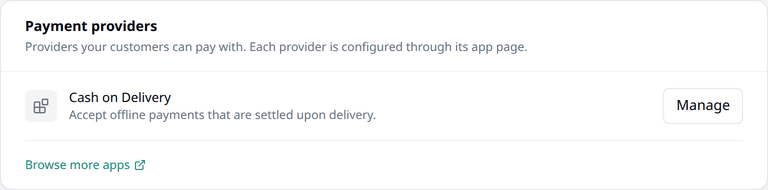
These are the payment apps for your storefront checkout. Press Manage to open an app's settings, or Browse more apps to see what else is available.
Just installed one?
This card does not update automatically — refresh the page to see a newly installed app listed here.
Saving
Every action on this page — adding, editing, archiving, deleting, reordering — takes effect right away. There is no separate Save button for this page.